This page has been visited 146519 times.
Dumbshit Survival X

Еaglеr Offline Download:

1.5.2 Client ||| 1.8.8 Client ||| 1.8.8 Client (WASM-GC) ||| 1.12.2 u3 Client ||| 1.12.2 u3 Client (WASM-GC)

Еaglеr Online Links:

1.5.2 Client ||| 1.8.8 Client ||| 1.8.8 Client (WASM-GC) ||| 1.12.2 u3 Client ||| 1.12.2 u3 Client (WASM-GC)

Еaglеr ZIP Download:

1.5.2 Client ||| 1.8.8 Client ||| 1.8.8 Client (WASM-GC) ||| 1.12.2 u3 Client (JS) ||| 1.12.2 u3 Client (WASM-GC)

DSSX IP:

Еaglеr (1.5.2, 1.8.8, 1.12.2): wss://mc.dssx.uk, wss://mc.dssx.us, wss://еaglеrcraft.uk, wss://еaglеr.site

Java (1.7.2 - 26.2): mc.dssx.uk, mc.dssx.us, еaglеrcraft.uk, еaglеr.site

Bedrock (26.0 - 26.23): mc.dssx.uk, mc.dssx.us, еaglеrcraft.uk, еaglеr.site

Offline Download Tutorial

For online links, click the link and start from Step 3.

  1. Click any of the links above to download the Еaglеr client. It should come up in the top-left corner, and the icon should be your browser's icon (Google Chrome icon, Microsoft Edge icon, etc.)
  2. Once you've downloaded it, you can just click the downloaded file in your browser's download list, or if your on Windows, you can just go to the 'File Explorer' and look for a 'Downloads' folder in the left column. This should open it in a new browser tab or window.
  3. Once you load and get to the "Edit Profile" screen, change your username to something you will remember, this is important as you will need to have the same username when you join the server again to save your progress. Player skin doesn't matter, you can choose any. Then press done.
  4. When you are on the title screen, click "Multiplayer".
  5. You should be on a screen that says "Play Multiplayer" at the top with 7 buttons at the bottom. Now you must press the "Add server" button.
  6. Under "Server Address" you must put in one of the IP's at the top, then press done.
  7. Now you should see a server in the list with the server icon, and the MOTD (the scrolling text). You can now double-click this and join the server! Enjoy, and hope someone else is on with you :)

ZIP Download Tutorial

  1. Click on any of the links on the "ZIP Download" line, this will then come up under a downloads tab at the top left, if it does not click Ctrl + J.
  2. Once you've downloaded it, you can just click the file in your browser's download list. Once you have it should open a file explorer window with a single .html file inside, once you see that just double click it and your in. The rest of this tutorial is from Step 3 of the tutorial above.

    Note: If you are having issues, try dragging the .html file (the one with the icon of your browser) out onto your desktop and double click it there instead.

Tips

  • Press F11 (or Fn + F11) to go into fullscreen to have more responsive mouse movements, this especially helps if you're on a laptop with a trackpad.
  • On the title screen, press "Options...", this will give you many useful options like changing your FOV (Field of View, makes the camera wider).
  • Along with the FOV slider, You can also go into "Video Settings" and drag everything down to get better performance. If you have bad performance, like it being choppy or not smooth, take the render distance slider down to make it better.

Еaglеr Client Archive

Еaglеr Version Online Offline (HTML) Offline (Compressed ZIP)
Alpha 1.0.6_03 (25w23a) Еaglеr 41.8 MB 28.0 MB
Beta 1.2_02 (25w24b) Еaglеr 35.3 MB 25.4 MB
Beta 1.4_01 (25w24c) Еaglеr 33.8 MB 17.1 MB
Alpha 1.1.2_01 (25w26b) Еaglеr 32.8 MB 23.7 MB
Beta 1.5_01 (Unblocked Test) Еaglеr 35.5 MB ? MB
Beta 1.5_01 (25w26a) Еaglеr 35.5 MB 17.9 MB
Release 1.7.10 (u0) Еaglеr 17.2 MB 7.58 MB

Music Player

  • 1 Jazz Ass 6:54
  • 2 Blue Haze 7:13
  • 3 The Essence 7:36
  • 4 Heat 7:17
  • 5 Positive Notions 7:52
  • 6 Deep In You (Ed Rush & Nico Mix) 8:03
  • 7 Marianna Carley 7:01
  • 8 Subphonic 7:42
  • 9 Imagine 7:44
  • 1 Going Gets Tough 7:48
  • 2 Sleepless 7:06
  • 3 Down 6:51
  • 4 Anything Goes 6:37
  • 5 Boymerang - Soul Beat Runna 7:59
  • 7 Circles (dRamatic & dbAudio Remix) 6:45
  • 8 Acid Shock 5:43
  • 9 Homeland (Subject To Reason mix) 6:34
  • 10 New Generation (Boymerang Mix) 8:41

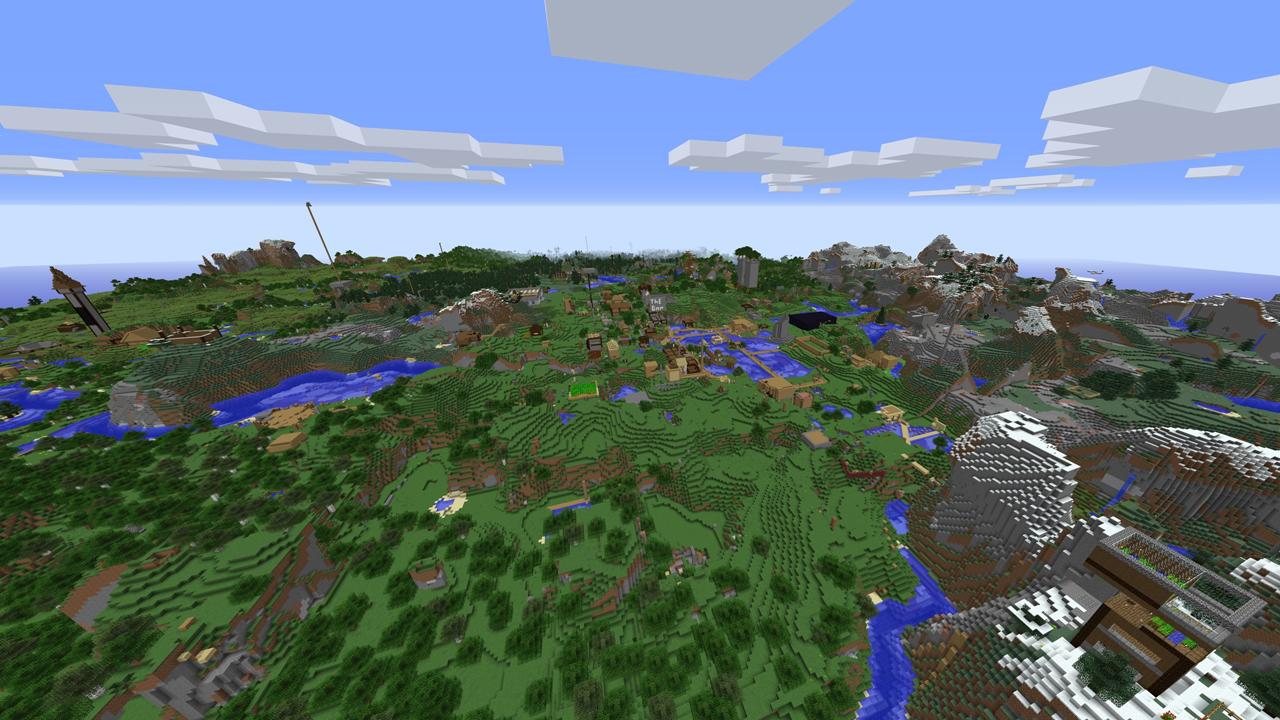
530 Megapixel Server Screenshot

Spawn Screenshot

Warning: Because these images are so big loading these below may crash your web browser or lag it out alot. Image was taken at 06/09/2025

High Quality (268 MB) | Medium Quality (61.1 MB) | Low Quality (16 MB)

Guestbook (Temporarily closed due to bots)

Entries:

		  [2025-07-09 23:22:54] Owner: Enter anything you would like!
[2025-08-22 01:44:47] Leafty67: yo
[2025-08-22 13:30:35] 1.20: hi
[2025-09-03 17:08:38] MattRo24TheDev: hi gang
[2025-09-07 01:47:46] CombustibleLemon: DON'T fuck with Dan Incognito.
[2025-09-07 01:50:11] pvl.cin: i fuck with dan incognito
[2025-09-08 13:09:08] qrvxnd3tta: nice fella
[2025-09-08 13:09:12] EZK1LLZ: GOD IS GOOD GOD IS GREAT
[2025-09-08 20:31:51] kaidun1112cubosh: hi
[2025-09-10 05:36:02] Captain_Dude_XD: Captain_Dude_XD
[2025-09-11 15:40:41] Silliest: Keep It Silly. 
[2025-09-15 15:04:37] Rando_Mizzer: Beautiful Server
[2025-09-24 22:17:42] d.singleton9: hi
[2025-09-26 10:22:37] samsonite: greetings from the shithole

          

Legacy Peaceful Worldfile Download

folder

Click the folder to download the worldfile. It's a 13.7GB .7z file, and it includes the Homes database and Claims database (both from 11th of November). The overworld region files are from the 29th December 2025, whereas the Nether and End region files are from the 11th November 2025. All are in .mca format, but due to the massive filesize they probably won't convert on Еaglеr.

Info:

Massive credit to tzenfore, an admin on DSSX, for the complete website design overhaul, looks amazing now.

If you have any copyright requests or need general help, please email help@dssx.uk

Page last modified (GMT+0): 2026-07-22 14:14:59